
Live chat for your website, with an AI that actually answers
One script tag puts a chat bubble on every page. The AI answers from your help articles, product pages and docs — and hands the conversation to a person the moment it can't answer from your content. Same widget, same thread, nothing for the visitor to repeat.
No credit card. The free plan has no time limit.
1. Paste the snippet
2. Connect your knowledge
3. Go live and watch the inbox
This chat bubble, on your site
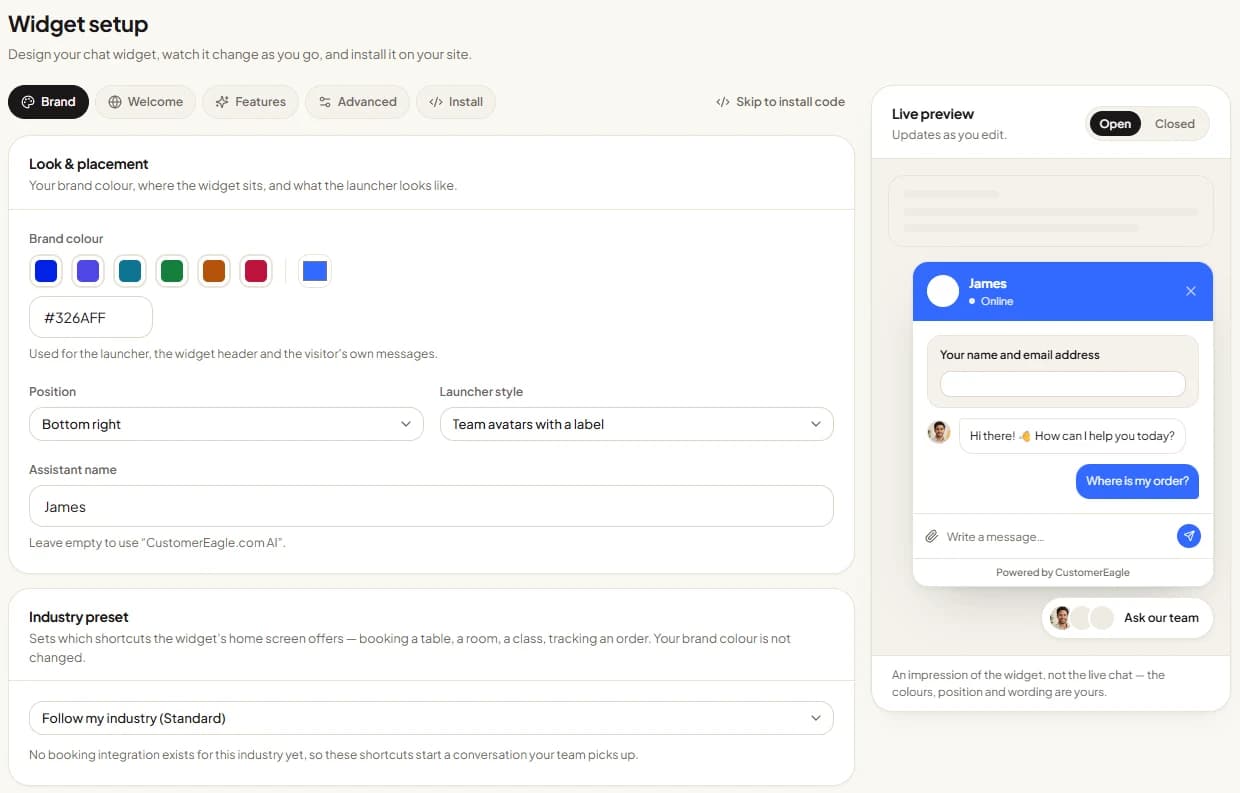
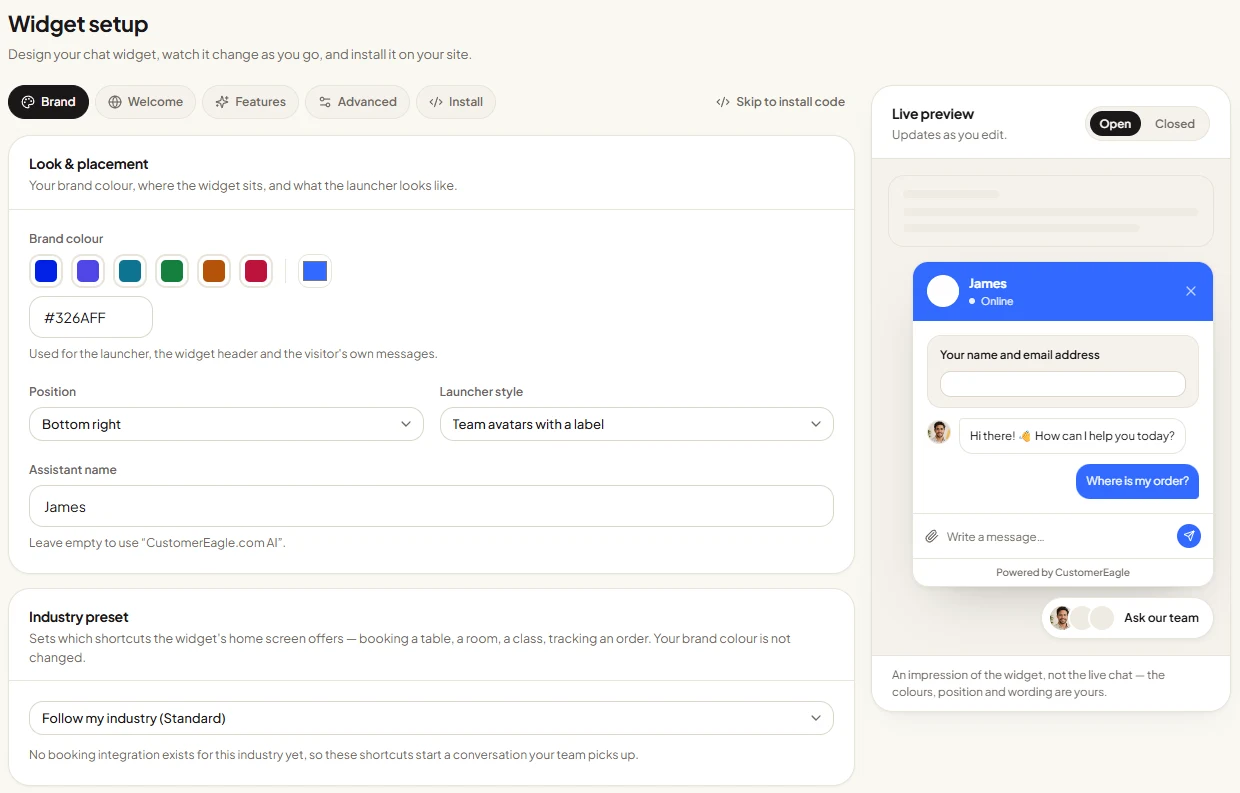
The widget in the corner of this page is the live product, not a recorded video. It runs on our own help center, so ask it about setup, pricing or data protection and you'll see how it answers from real content. On your site it reads your content instead of ours, in your colours and your wording.
<script src="https://api.customereagle.com/widget.js?tenantId=YOUR_WORKSPACE_ID" async></script>What you install is one <script> tag before the closing </body> tag, carrying your workspace ID. No theme edits, no rebuild, no change to how your pages are served — and you list the domains it's allowed to load on, so it only appears where you want it.
Adding live chat to your website takes three steps
1. Paste the snippet
Copy one line of JavaScript into your site template — or, on WordPress, install the CustomerEagle plugin and paste your workspace ID instead. The bubble shows up on every page, and the WordPress plugin lets you exclude paths like checkout or your admin area.
2. Connect your knowledge
Upload PDFs, write articles in the built-in help center, or import your existing articles from Zendesk, Intercom or Freshdesk. On Professional and up you can also point it at your website or sitemap and have it crawl, index and keep those pages fresh. Every AI answer records the sources it used, and you can show them in the widget.
3. Go live and watch the inbox
Switch the widget on and invite your team. Conversations land in a shared inbox with the full transcript, so any agent can take over mid-chat. Set office hours and an auto-reply so visitors know when a human is around and what happens next.
What separates this from a plain chat box
Most live chat software is a box that waits for a human to be free. This one answers first, then gets out of the way when a person is needed.

AI answers, included in the widget
The assistant handles the questions that repeat all day — delivery times, opening hours, returns, how-do-I — using your own content, with citations. When it can't ground an answer in what you've given it, it says so and passes the conversation to a person instead of inventing something. Paid plans include a monthly allowance of AI resolutions per agent; the free plan comes with a one-off batch so you can see how it does on your questions before paying anything.
Your team sees everything
There's no separate bot log to reconcile. AI replies and human replies are one thread in one shared inbox, alongside the customer's earlier conversations and the sources the AI cited. An agent can read the last two minutes and take over without asking the visitor to start again — and every conversation stays searchable afterwards.
Actions in the chat, not just links
A conversation doesn't have to end with "here's a link". Restaurants can take a table booking inside the widget (resOS or Guestplan), gyms can book a class (Mindbody, Glofox, TeamUp), hotels connect through Mews, and webshops can let a customer check an order — after an email match against that order, so details are never handed to the wrong person. Writes stay supervised: the AI can prepare a refund or an order change, but a human approves it before anything happens. These connections need a paid plan with the matching integration set up.
Live chat, explained without the sales pitch
What is website live chat?
Website live chat is a chat window on your own site where a visitor types a question and gets an answer in the same session, without leaving the page or sending an email. Classic live chat routes that message to whichever agent is available. Modern live chat software adds an AI layer in front: it answers what it can from your help content immediately, and escalates the rest to a human with the conversation attached. The visitor experience is the same either way — a bubble in the corner, a reply in the thread.
Live chat vs chatbot: you don't have to choose
A chatbot follows scripted flows or answers from a knowledge base; live chat connects a visitor to a person. Buying one instead of the other is what makes both disappointing — a scripted bot dead-ends on anything unusual, and a human-only queue means nobody gets an answer at 22:00. The workable version is one widget doing both: AI answers grounded in your content, with a handover to a human that carries the whole transcript. That's how CustomerEagle is built, and the handover is not an add-on you buy separately.
How to choose a live chat provider
Five things are worth checking before the design of the bubble: where the AI's answers come from (your content with citations, or a generic model that improvises); whether a handover to a human keeps the conversation or starts a new one; whether the AI can do anything besides talk, such as looking up an order or taking a booking; what happens outside office hours; and where your data is hosted and processed. Pricing structure matters too — per agent, per conversation and per resolution are very different bills at the same headline number. Ask each vendor how they count.
What's a good response time on live chat?
The honest benchmark is simpler than the industry averages people quote: fast enough that the visitor is still on the page. That's why the first reply matters more than the average — an AI answer that arrives while someone is reading a product page is worth more than a perfect human reply an hour later. Practically, that means three settings: let the AI answer immediately, publish office hours so expectations are clear, and use an auto-reply plus SLA policies (on paid plans) so anything waiting for a human has a deadline attached rather than sitting in a queue.
Works with the site you already have
The widget is one script tag, so it runs on WordPress, Webflow, Squarespace, a Next.js app or a hand-written HTML page equally well. On WordPress there's a dedicated CustomerEagle plugin: install it, paste your workspace ID, and the chat is live without touching your theme — handy on WooCommerce stores, where you can also connect read-only store keys from Standard up so the AI can look up an order for a verified customer. Shopify stores can install the same script in their theme, with deeper store-data access available through our Shopify integration on Standard plans and higher. Whatever the platform, remember to add your domain to the widget's allowed-domains list.
Live chat questions people actually ask
Add live chat to your website by pasting one line of JavaScript into your site template, just before the closing body tag, with your workspace ID in it. On WordPress you can install the CustomerEagle plugin instead and paste the ID into its settings page — no theme editing. After that you list the domains the widget may load on, connect your help content so the AI has something to answer from, and invite your team to the shared inbox.
Yes. CustomerEagle has a free plan that costs nothing, needs no credit card and has no time limit: one agent, live chat and email, and a shared inbox. It also includes a one-off batch of AI resolutions so you can test the AI assistant on your own content before deciding. Recurring AI resolution allowances, extra agents and the commerce integrations sit on the paid plans.
Live chat connects a website visitor to a human agent in real time; a chatbot replies automatically, either from scripted flows or from a knowledge base. The practical difference is what happens with an unusual question: a human can improvise, a scripted bot dead-ends. Tools that combine both — AI answering from your own content, with a handover to a person when it can't — avoid forcing the choice, which is how CustomerEagle's widget works.
Most live chat software is priced per agent per month, and AI features are usually billed on top — per conversation, per resolution, or as a separate plan tier. CustomerEagle has a free plan at zero cost with one agent, and paid plans priced per agent per month that include a monthly allowance of AI resolutions per agent, with extra resolutions metered on the next invoice. Current prices for every plan are on the pricing page; comparing vendors on the headline number alone is misleading unless you also compare what counts as a billable AI interaction.
Many people reach for chat first because it's the only support channel that doesn't cost them a wait or a wait-for-reply — they stay on the page they were already on. We don't publish an industry percentage because we can't source one we'd stand behind. What we can say is what chat structurally does well: instant answers to short factual questions, and a written record both sides can refer back to.
The useful target is a first reply that arrives while the visitor is still on your site, which in practice means seconds rather than minutes for common questions. An AI layer covers that, because it answers immediately at any hour, including nights and weekends. For anything handed to a human, published office hours, an auto-reply and SLA policies (available on paid plans) keep the expectation honest instead of leaving someone watching an empty chat window.
Yes. WordPress sites can install the CustomerEagle plugin and paste a workspace ID — no theme edits — and WooCommerce stores can additionally connect store keys from Standard up so the AI can look up orders for a verified customer. Shopify stores can add the same widget script to their theme, with store-data access available through the Shopify integration on Standard plans and higher. Any other platform works too, because the widget only needs one script tag.
Put live chat on your website this afternoon
Create a workspace, paste the snippet, point the AI at your help pages, and watch the first real conversations come in. Start on the free plan without a credit card, or book a demo if you'd rather see it against your own content with someone on the call.
No credit card. The free plan has no time limit.